

Connector catalog
Find a connector, see which ones have their own guide, and learn how to add one.
En esta página
A connector is a set of tools for one outside service, such as Gmail or Postgres. This page helps you find connectors and shows common ways to combine them. It is for anyone planning which services a workflow will use.
The platform catalog includes more than 400 connectors. This page lists the ones that have their own guide in the Connectors section (/connectors/{slug}), with setup, tools, and configuration for that connector. To see everything available to you, open MCP in the Console, click Add connectors, and browse or search the App catalog.
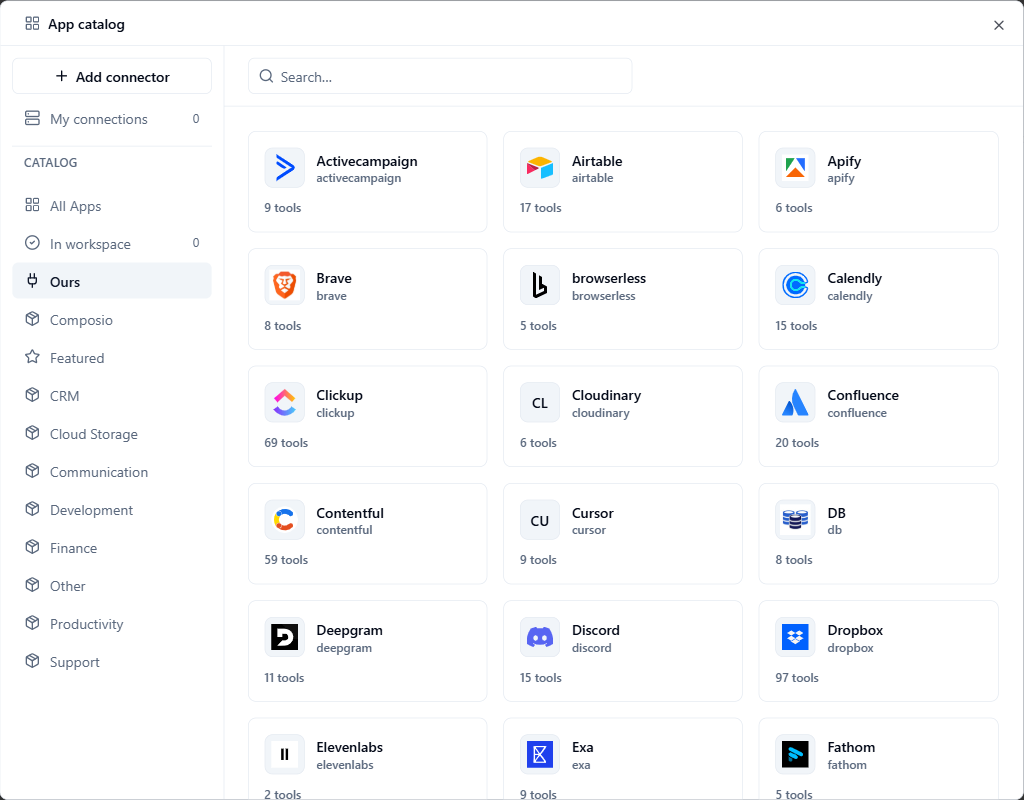
Click a connector to see its version, its tools, and the Add to workspace button.
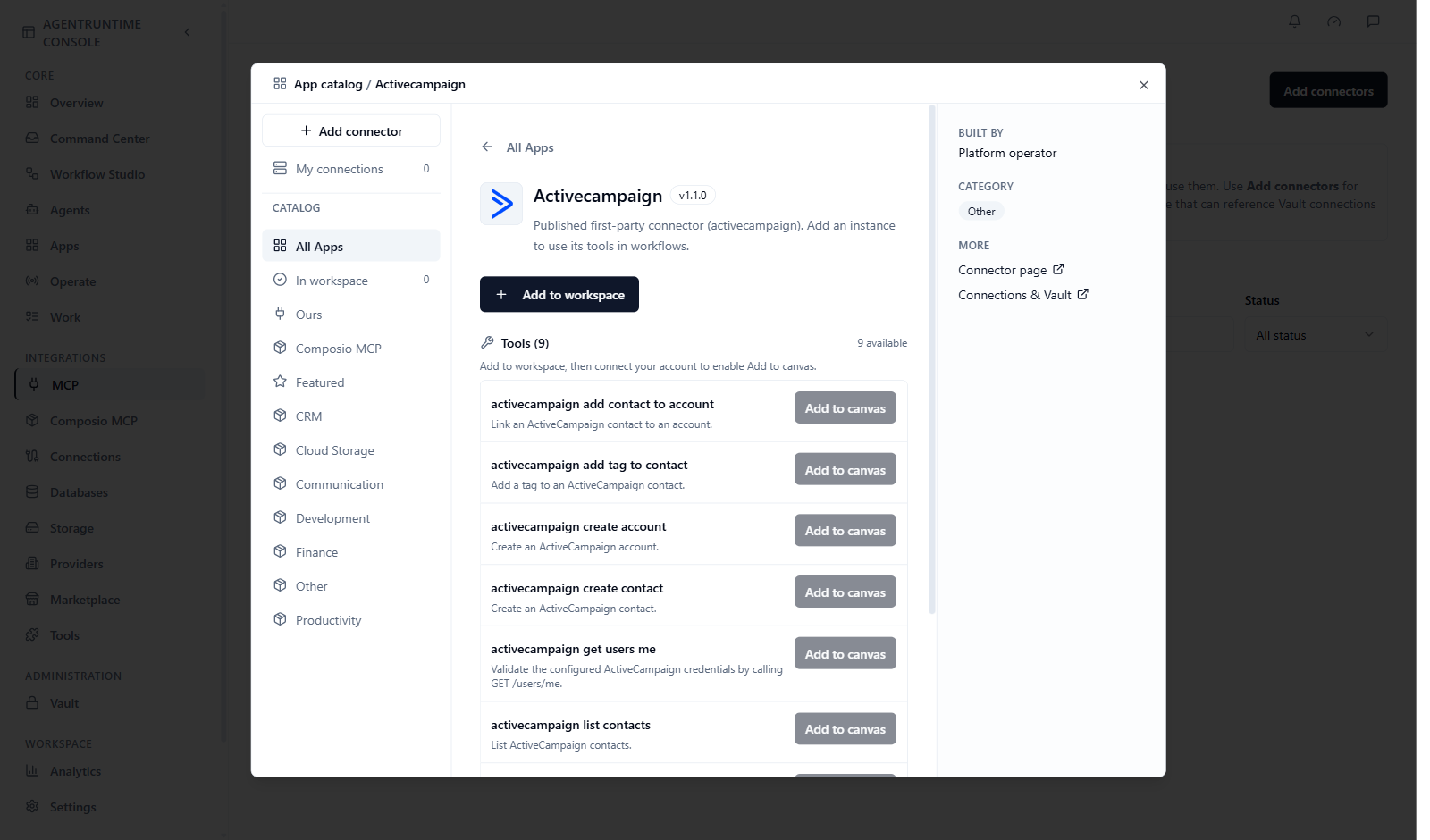
Setup that is the same for every connector (connections, instances, webhooks) is explained in the Integration setup pages: Quickstart, Connections, and MCP instances. Connector pages cover only that connector.
Common patterns
Most production workflows combine a few connectors with LLM and human steps. Start from a pattern, then open the connector pages for tool names and sign-in details.
| Pattern | Flow | Example guide |
|---|---|---|
| Webhook → store → notify | Inbound event → validate → database INSERT → optional digest email | Form → Postgres → Resend |
| Event → lookup → message | External webhook → MCP fetch → customer notification | Shopify → WhatsApp |
| Conversation → agent → person | Customer message → agent reply in one ongoing session → hand-off to staff → back to the agent | WhatsApp customer chat |
| Fetch → LLM → human → action | Read source data → draft with LLM → Command Center approval → MCP write | GitHub PR review |
| Schedule → query → summarize → email | External cron → SQL report → LLM narrative → Gmail/Resend | Postgres weekly report |
| Webhook → CRM + log | Lead form → CRM contact + parallel audit row (Notion/Sheets) | Lead sync |
| Approve then send | Draft → a Human step → outbound MCP (any channel) | Workflow patterns |
Google Workspace
One Google sign-in powers most of these connectors (Google Search uses Vertex AI Search; see its page):
| Connector | Best for | Docs |
|---|---|---|
| Gmail | Transactional email, inbox search, thread replies | gmail |
| Google Calendar | Meeting scheduling, availability, event CRUD | google-calendar |
| Google Docs | Template docs, mail-merge style content | google-docs |
| Google Drive | File upload, sharing, folder automation | google-drive |
| Google Forms | Form creation, response export | google-form |
| Google Search | Vertex AI Search (grounded retrieval) | google-search |
| Google Search Console | SEO analytics, sitemap and URL inspection | google-search-console |
| Google Sheets | Ops dashboards, CSV sync, reporting tabs | google-sheets |
| Google Slides | Deck generation from workflow data | google-slides |
| Google Tasks | Follow-up task lists from automations | google-tasks |
Communication
| Connector | Best for | Docs |
|---|---|---|
| Customer notifications, templates, session messaging | ||
| Resend | Transactional email from a verified domain | resend |
| Vapi | Listing and inspecting voice assistants | vapi |
| ElevenLabs | Text-to-speech and voice synthesis | elevenlabs |
| Slack | Post messages, read channel history and threads, add reactions | slack |
CRM and marketing
| Connector | Best for | Docs |
|---|---|---|
| ActiveCampaign | Contacts, lists, tags, account sync | activecampaign |
| Personal and company posts, org admin | ||
| Shopify | Products, orders, customers, inventory | shopify |
| Reading and creating posts and comments | ||
| YouTube | Searching videos; channels, playlists, comments | youtube |
Productivity
| Connector | Best for | Docs |
|---|---|---|
| ClickUp | Tasks, lists, and project management | clickup |
| Notion | Databases, pages, comments, run logs | notion |
| Wrike | Enterprise PM tasks and folders | wrike |
| Cursor | Launching and managing Cursor cloud agents | cursor |
Developer tools
| Connector | Best for | Docs |
|---|---|---|
| GitHub | Repos, issues, PRs, code search | github |
| GitLab | GitLab API projects and merge requests | gitlab |
| Browserless | Headless browser screenshots and PDFs | browserless |
| Exa | Neural web search for research agents | exa |
| Brave Search | Web search API for grounded answers | brave |
Databases and data stores
| Connector | Best for | Docs |
|---|---|---|
| Postgres | Production SQL, reporting, operational writes | postgres |
| MySQL | MySQL/MariaDB apps and legacy schemas | mysql |
| MongoDB | Document store queries and updates | mongodb |
| Redis | Cache, queues, rate-limit counters | redis |
| SQLite | Local file DB, prototypes, edge datasets | sqlite |
| Neo4j | Graph queries and relationship analytics | neo4j |
| Firestore | Google Cloud document database | firestore |
AI and media
| Connector | Best for | Docs |
|---|---|---|
| OpenAI Image | DALL·E / GPT image generation | openaiimage |
| Gemini Image | Google Gemini and Imagen image generation | geminiimage |
Other
| Connector | Best for | Docs |
|---|---|---|
| RSS | Feed aggregation and news monitoring | rss |
| Healthcare | Mock clinical APIs for demos (not production PHI) | healthcare |
Connectors with a guide (A–Z)
activecampaign
brave
browserless
clickup
cursor
elevenlabs
exa
firestore
geminiimage
github
gitlab
gmail
google-calendar
google-docs
google-drive
google-form
google-search
google-search-console
google-sheets
google-slides
google-tasks
healthcare
mongodb
mysql
neo4j
notion
openaiimage
postgres
redis
resend
rss
shopify
slack
sqlite
vapi
wrike
youtube
How to add a connector
- Read the Integrations quickstart.
- Create a connection if the connector needs credentials.
- In MCP, click Add connectors, select the connector, and click Add to workspace.
- Attach the connection on the instance's Instance config page. See MCP instances.
- Open the connector's guide above for tool names and settings.
- For multi-connector recipes, see the end-to-end guides.
If a connector you need is not in the catalog, you can register your own MCP server.