

Notifications and the credits panel
What the bell and the credits icon in the Console top bar show, and how to read the numbers in them.
En esta página
The top bar has three icons with no text labels. This page covers two of them: the bell and the credits icon. The third, the speech bubble, opens the chat panel: see Autopilot and chat.
Who this is for: anyone who wants to know where their balance is and where alerts go.
The bell: notifications
Click the bell. A panel opens with Notifications and Mark all read. When there is nothing new it says No new notifications.
The bell does not collect everything you might expect. In testing it stayed empty after runs, approvals, and a rejection. Approvals waiting for you show as a badge on Command Center in the sidebar, not in the bell. Check Command Center for tasks and Runs for failures. A new member can see a count on the bell right after joining a workspace; which events appear there is not documented yet.
The credits icon: your balance
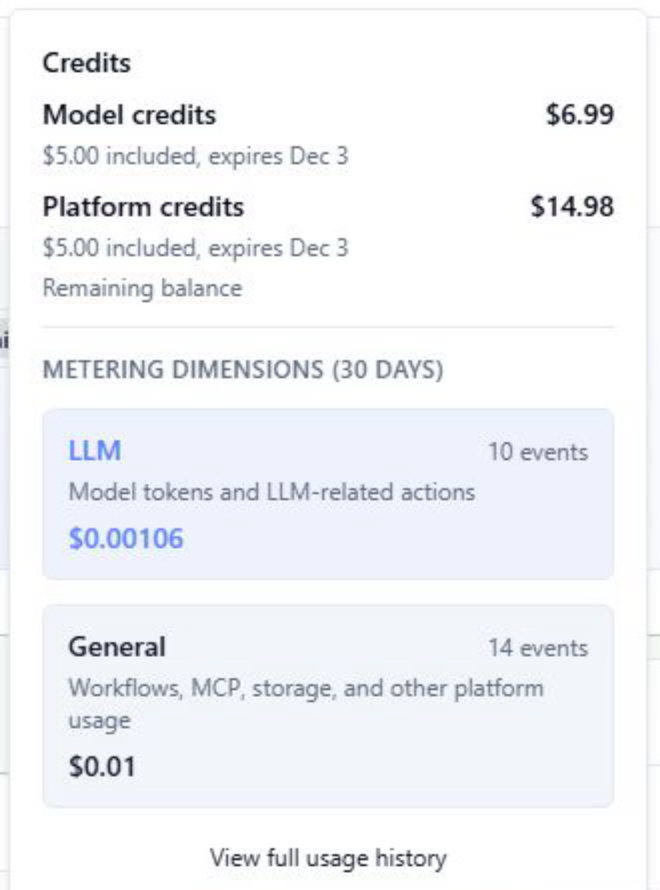
The middle icon, which looks like a gauge, shows your credits. Click it to open a panel headed Credits.
- Click the credits icon
You should see: two balances and a usage summary.
- Read the balances
Line Meaning Model credits Credits for AI model use. A small line under it shows how much is included in your plan and when it expires, for example "$5.00 included, expires Dec 3". Platform credits The remaining balance for platform usage. - Read the usage
Under Metering dimensions (30 days) you see two rows with the number of events and the cost: LLM ("Model tokens and LLM-related actions") and General ("Workflows, MCP, storage, and other platform usage").
- See the full history
Click View full usage history.
Why the numbers can look odd
The Console shows the same credits in two units. The credits panel and Billing show dollars. Analytics shows credits. One credit is $10 of face value, so $0.0015 in the panel is 0.00015 credits in Analytics. Very small costs can show as $0.00.
LLM can show 0 events and $0.00 after you ran an AI step. AI usage is charged only for models that have a price. The default model in the recipes and in the chat panel does not have one yet, so those calls are recorded but cost nothing. Only Claude Haiku 5.5 has a price today. If you rely on this panel to see AI costs, choose a model that has a price. See Models and providers.
Next steps
- Billing and credits: plans, balances, and top-ups.
- Analytics: usage over time.
- Top up credits
- Models and providers