

Run a workflow from code
Copy a ready-made request from the Share dialog and start a workflow from your own script with an API key.
En esta página
The API / script tab of the Share workflow dialog gives you a request you can paste into a terminal or a program. It starts a run with an API key.
Who this is for: developers who start workflows from their own system. You need a workspace API key with permission to run workflows.
Steps
- Create an API key
Open Settings → API keys and create a key that can run workflows (
workflow:run). Copy it when it is shown. See Authentication. - Open the API / script tab
In Workflow Studio, click Share → Share settings… and open the API / script tab. It reads: "Run with an API key. Copy a ready-made request for your stack."
- Pick your language and copy
Choose cURL, PowerShell, Python, Go, or TypeScript, and copy the request.
- Replace the placeholder
Replace
YOUR_TOKEN_HEREwith your key. Do not commit real keys to git.You should see: a response that includes the id of the run that started. Open it under Runs or in Command Center.
The request
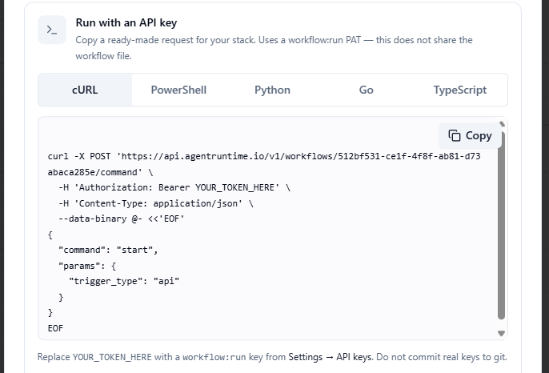
The tab shows a POST request to the workflow's command URL. For example, with cURL:
curl -X POST "https://api.agentruntime.io/v1/workflows/YOUR_WORKFLOW_ID/command" \
  -H "Authorization: Bearer YOUR_TOKEN_HERE" \
  -H "Content-Type: application/json" \
  -d '{"command":"start","params":{"trigger_type":"api"}}'
The dialog fills in your workflow's real id. Use the copy button there rather than typing it.
| Part | Meaning |
|---|---|
Authorization: Bearer YOUR_TOKEN_HERE | A personal access token (PAT) with the workflow:run scope. |
"command":"start" | Starts a run. |
"trigger_type":"api" | Records that the run came from the API. |
The sample body has no input values. If your workflow expects start inputs such as customer and message, the run uses the sample values saved in Setup. To send your own values, see Variables and inputs and the API reference.
This tab does not share the workflow. It only lets your key start it. Do not paste a real key into a script that you commit or share. Revoke a key under Settings → API keys if it leaks.
Next steps
- Authentication: keys and scopes.
- API examples
- API reference
- Share a workflow