

Roles and permissions
Workspace roles, project roles, public and private projects, and how access is assigned in the AgentRuntime Console.
En esta página
This page explains who can do what in AgentRuntime. It is for admins who assign access and for anyone who sees a "permission denied" message.
The two layers
Access has two layers:
- Workspace role — your role in the whole workspace. It controls team invites, billing and workspace policy.
- Project role — your role inside one project. It controls what you can build and run there. This is the role most people use every day.
Workspace roles
| Role | What you can do |
|---|---|
| Member | Belong to the workspace. On public projects you get Contributor access automatically. |
| Admin | Manage team invites, billing settings, domain verification and workspace access policy. |
| Owner | Full workspace control, including billing ownership and promoting other admins or owners. |
A workspace email invite sets only the workspace role. It does not attach a project. After accepting, the person can use public projects as a Contributor.
In the API, the workspace admin role is called tenant_admin.
Role names in the Console and in these docs
The Console labels the workspace role Member, Admin or Owner, and the project roles Project admin, Contributor and Project viewer. These docs use the role slugs when they describe permissions:
| Console label | Role slug |
|---|---|
| Admin and Owner (workspace) | tenant_admin |
| Project admin | project_admin |
| Contributor. A workspace Member gets this role on public projects by default. | project_contributor |
| Project viewer | project_viewer |
You cannot easily make an existing member view-only. On Settings → Team & Members → Current members, the role menu on a member's row offers only Member, Admin and Owner. Project members lists only people who already have an explicit project role, and has no Add button. The one place that attaches a project role is Create user, and that needs a DNS-verified workspace domain. So a colleague who accepts an email invite gets Contributor access to public projects, and the Console gives you no obvious way to lower it to Project viewer. If you need view-only access, make the project private and add people to it with the role you want, or ask support.
What a Member sees
Pages that need more than a workspace Member role are handled in three different ways:
| Page | What a Member sees |
|---|---|
| Settings → Team & Members and CI sign-in | The tabs are hidden. If you open /settings?tab=team by address, the Console quietly takes you to General, with no message. |
| Settings → General | Read-only text: only workspace owners and tenant admins can change the workspace name or handle, and only workspace administrators can request workspace deletion. |
| Settings → API keys | The page opens and Create API key is shown, with the message "You don't have access to that. Ask a workspace admin if you need this permission." A click on the button is then refused. |
| Settings → Integrations | Fully visible, including the Google and TikTok OAuth application forms, with no role notice. Whether Save is refused was not tested. |
| Settings → Audit log | Visible. It lists who was invited and by whom. |
| Billing | Visible. Add credits, Move credits and Add card are disabled. See Billing and credits. |
Project roles
Project viewer
project_viewer.Contributor
project_contributor.Project admin
project_admin.What each project role can do
| Capability | Viewer | Contributor | Project admin |
|---|---|---|---|
| View workflows and runs | ✓ | ✓ | ✓ |
| View billing and usage | ✓ | ✓ | ✓ |
| Create, edit and publish workflows | ✓ | ✓ | |
| Start, pause and stop runs | ✓ | ✓ | |
| Create and edit connections and MCP instances | ✓ | ✓ | |
| Delete workflows, agents and connections | ✓ | ||
| Manage project members | ✓ |
Changing a plan, adding credits and similar billing actions need a workspace Admin or Owner, not a project role. A workspace Member can open Billing, but Add credits, Move credits and Add card are disabled for them. See Billing and credits.
Public and private projects
- Public — every workspace member can use it, as a Contributor unless you give them a different project role.
- Private — only members you add can see it. It is hidden from the project switcher for everyone else.
To change this, open the ⋮ menu next to the project in the project switcher, click Project settings, and use the Project visibility switch. To add people to a private project, use the Members tab in the same dialog.
Workspace Owners and Admins can open private projects they are not members of, but they get read-only access by default. To let them edit, go to Settings → Team & Members and turn on Full access on private projects, then click Save policy.
Where to manage access
| Task | Where |
|---|---|
| Invite someone to the workspace | Settings → Team & Members (Admin or Owner) |
| Change someone's workspace role | Settings → Team & Members → Current members |
| Change someone's project role | Settings → Team & Members with the project selected, or Project settings → Members |
| See your own roles | Settings → My access |
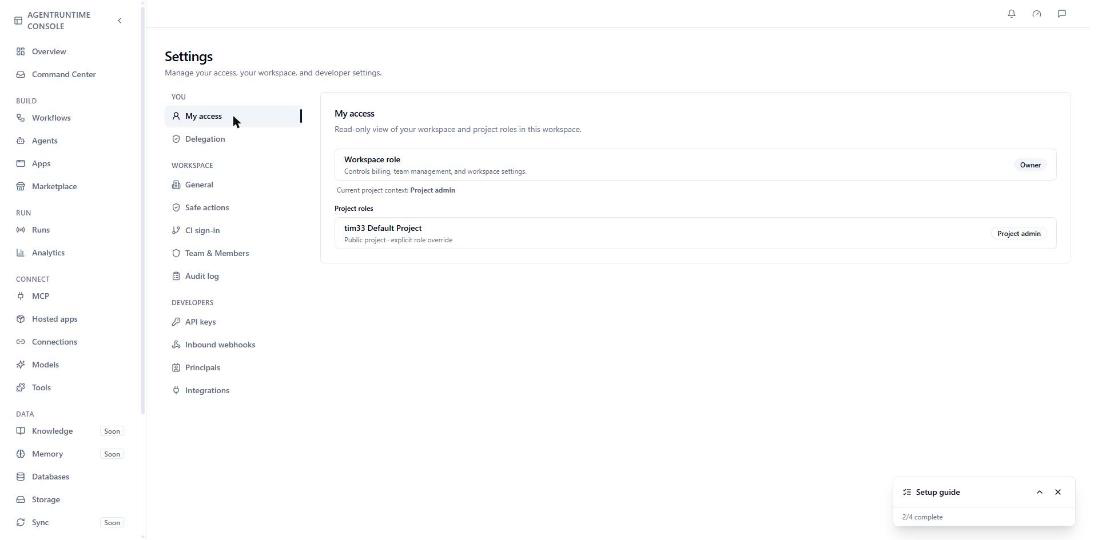
Access for API keys
An API key (personal access token) can never do more than the person who created it. Both the person's project role and the key's scopes must allow an action.
| Scope | Allows |
|---|---|
workflow:read | List and read workflows, runs and events |
workflow:run | Start, pause, resume and stop runs, and validate workflows |
mcp:execute | Call MCP tools directly, and run MCP steps from schedules and webhooks that use the token |
Other scopes exist, for example for managing workflows, connections, agents and webhooks. See API authentication for how to pick scopes. Create keys in Settings → API keys.
Common problems
| Problem | What to try |
|---|---|
| A project is missing from the switcher | It is private and you are not a member. Ask a project admin to add you. |
| A button is disabled or you see "permission denied" | Check your roles in Settings → My access, then ask an admin. |
| An admin cannot edit a private project | Add them to the project, or turn on Full access on private projects. |
An API call returns 403 | Your project role or the key's scopes are too narrow. See Troubleshooting. |