

Billing and credits
Where to manage your plan, credits, payment card and billing history in the Console, and a guide to every billing page.
En esta página
This page is for people who pay for AgentRuntime or want to understand what uses credits. You will learn where billing lives in the Console, who can change it, and where to find the details.
Billing is in early access. Plans, prices and how usage is counted in credits may change. Plans and credits holds the current prices and amounts, and the Plans tab in the Console always shows what applies to your workspace today.
Credits in one minute
AgentRuntime measures usage in credits. When your workflows run, they use credits from your workspace balance. There are two kinds:
- Model credits pay for AI model calls that AgentRuntime pays the provider for.
- Platform credits pay for what AgentRuntime itself does, such as running workflow steps.
Credits come from a free trial, from your plan, from top-ups you buy, and from referral rewards. Top-up credits do not expire. See Plans and credits for the details and the current numbers.
On Billing the two kinds sit side by side as Model credits and Platform credits, each with a dollar amount, for example $7.00 and $14.99. The page does not define them. A line under Model credits, such as "$5.00 included, expires Dec 3" and "$2.00 from your trial, expires Dec 3", can look like two separate pots. They are parts of the same model-credit balance.
Credits and dollars
The Console shows the same balance in two units:
| Where | Unit | Example |
|---|---|---|
| Billing (Overview, Usage) | Dollars | Model credits $7.00, Platform credits $14.99 |
| Credits panel in the top bar (the middle of the three icons, a gauge) | Dollars | General $0.0015 |
| Analytics | Credits | Credits used 0.00015 credits |
1 credit = $10 of face value, so $0.0015 is 0.00015 credits. The two numbers are the same cost, not a mismatch.
The credits panel (click the gauge icon, which has no text label) lists your Model credits and Platform credits and, for the last 30 days, METERING DIMENSIONS: LLM ("Model tokens and LLM-related actions") and General ("Workflows, MCP, storage, and other platform usage"), each with a count of events and a cost, and a View full usage history link. It rounds to whole cents, so a very small cost shows as $0.00.
AI answers can look free. AI model cost is charged only for models that have a price. In testing, only Claude Haiku 5.5 had one. GPT-4o mini, the default model in the recipes and in Autopilot, was recorded but charged $0.00, so LLM read 0 events and Model credits did not change after it ran. Pick another model to see AI cost. See Workflow Studio.
Where to manage billing
Click Billing in the Admin group of the Console sidebar. The page has three tabs:
| Tab | What you can do |
|---|---|
| Overview | See your plan, credits and card, add credits, move credits, read your billing history, and see who is billed |
| Plans | Compare plans, start a trial, subscribe, upgrade, downgrade or cancel. Enter a Promo or referral code here. |
| Usage | See Credits remaining and the Usage history list |
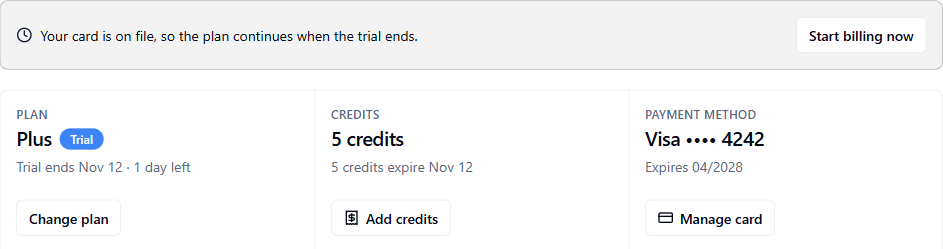
The Overview tab has:
- An alert at the top, only when something needs you: a payment that is past due, a payment waiting for your bank, a trial that is running or has ended, or a subscription that is ending.
- A summary row with three boxes: Plan (the plan name, a status label such as Active, Trial or Ending, and the next date), Credits (your balance, with Add credits) and Payment method (your card, with Add card or Manage card). A line under it says who is billed.
- Billing history, one line per payment. See Billing history and invoices.
- Billing contact and who pays, a section you can open to see the billing contact and switch between workspace billing and personal billing.
Who can change billing
Everyone with project access can look at plans and usage. Only workspace admins (tenant_admin) and people with billing write access can change plans, manage the card, add credits or apply codes. If the buttons are disabled, ask an admin.
A workspace Member can open Billing and see your plan and trial end date, both credit balances, whether a card is on file, the billing history, and the line "Billed to name's personal billing" with the name of the person who pays. For a Member, Add credits, Move credits and Add card are disabled. The reason ("Billing admin permission required") shows only when you hover over the button, so it does not appear on a touch screen. Change plan is not disabled for a Member. Whether the server refuses it was not tested.
Billing guide
Plans and credits
Free trial
Subscribe, change plan and cancel
Add credits
Bank confirmation (3-D Secure)
Payment methods
Billing history and invoices
Taxes on your payments
Referrals and affiliates
Billing FAQ
Billing troubleshooting
See what you used
Open Billing → Usage. Credits remaining shows your balance. Usage history lists each charge with its date.
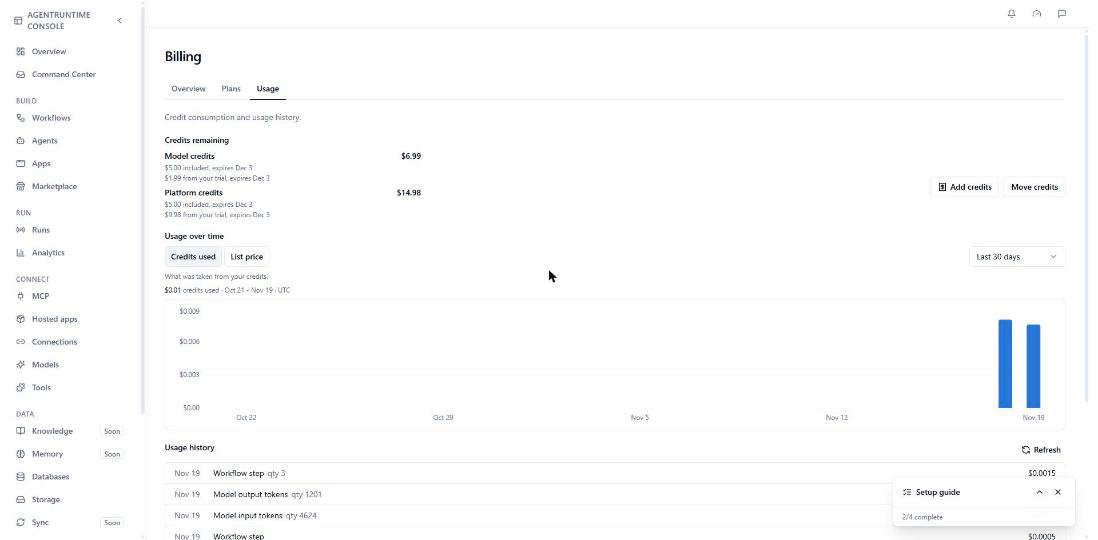
Analytics also shows credits used over time, next to your run counts. See Analytics.
For developers
You can read billing data from the API, for example GET /v1/billing/usage for your balance and GET /v1/billing/usage-history for charges. Changing plans and adding credits should be done in the Console.